How to find your corresponding 0x/f410 wallet address
To use GLIF, you might need FIL stored in an f410 or 0x address (where the first three characters after “f” are “410” or the first two characters are 0x). Every f410 wallet address has a corresponding 0x Ethereum-style address, and both contain the same amount of FIL. You can read about the technical details of all address type in the Filecoin documentation here.
When transferring FIL from an exchange or other wallets to GLIF, you might need to convert your Filecoin address between f410 and 0x formats. For example, if your wallet provides a 0x address but your exchange only supports an f410 address (or vice versa), you will need to convert it. However, if both your wallet and the exchange support the same type of address, you can skip this step.
Follow this step-by-step guide to complete the process. Once you've followed these steps, you can successfully find your corresponding 0x/f410 wallet address!
Step-by-step guide
- Connect your wallet to GLIF.
- In the top right corner of the GLIF website, navigate to your wallet address.
- The
0xand correspondingf410addresses will be displayed in the dropdown menu.
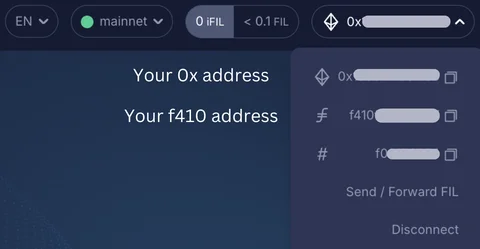
Once you find your corresponding address, you can use it to transfer your Filecoin from an exchange or between wallets!
Join our community!
- 📢 Stay informed with updates on our blog and X (Twitter)
- 🤝 Connect with us through Discord and Telegram for support and partnerships
- 💬 If you encounter any difficulties, please open a Discord support ticket
- ⚠️ Beware of scammers! GLIF team members have the role “GLIF” or “Moderator”