How to mint your GLIF+ SP Card
This tutorial explains how to mint a GLIF+ Storage Provider Card on the GLIF website using your Agent's multisig wallet. For more information about the different tiers and how GLIF+ Cards benefit you, see this page.
For other tutorials on managing your GLIF+ SP Card, see this page.
NOTE
You can also add or withdraw funds in your GLIF+ cash back vault using the GLIF Command Line Interface (CLI). To do so, upgrade to the latest release. You can find the instructions about the GLIF+ related command on the GLIF CLI on this page.
In this tutorial, you will be guided through the following steps:
- Step 1: Select your Agent
- Step 2: Select your tier
- Step 3: Enter cash back vault amount
- Step 4: Mint and Activate
- Step 5: Approve the first multisig proposal
- Step 6: Approve the second multisig proposal
- Step 7: View your minted Card
Step 1: Select your Agent
-
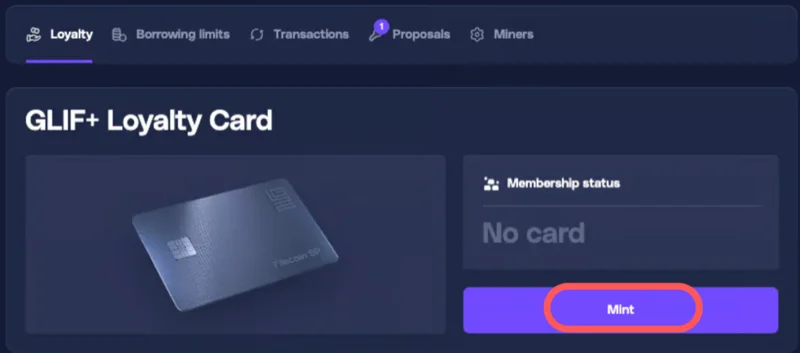
Connect your wallet and navigate to the 'Loyalty' tab of your Agent page on the GLIF website.
-
Click 'Mint'.
Step 2: Select your tier
-
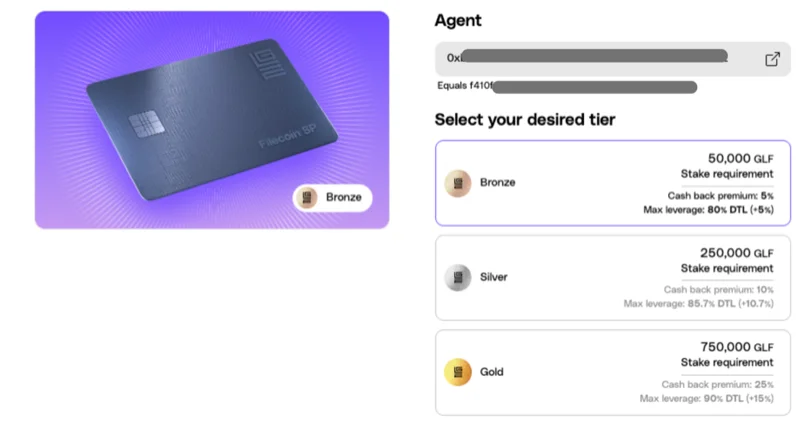
The Agent address should already be pre-filled. If not, enter your Agent address to continue.
-
Choose your desired tier from Bronze, Silver, or Gold.
-
Review the details to compare leverage, exchange TWAP benefits, and the stake requirement, which indicates how many $GLF tokens you must stake to activate the selected tier.
NOTE
Higher tiers provide stronger benefits such as higher TWAP exchange rates and higher borrowing leverage. For example, the Gold tier offers a maximum Debt to Liquidation ratio of 90%. For explanations of terms such as exchange TWAP or maximum leverage, refer to this page.
Step 3: Enter cash back vault amount
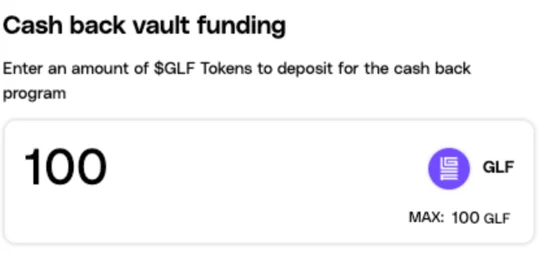
- Enter the amount of $GLF you want to put into the cash back vault.
The maximum amount shown here represents the $GLF you have, after deducting the mint cost and the stake requirement to deposit into the cash back vault.
NOTE
GLF in this vault allows you to cover part of each interest payment and receive FIL at a premium. You may add or withdraw GLF from the vault at any time. Funding the vault is optional and not required to mint the card.
Step 4: Mint and Activate
-
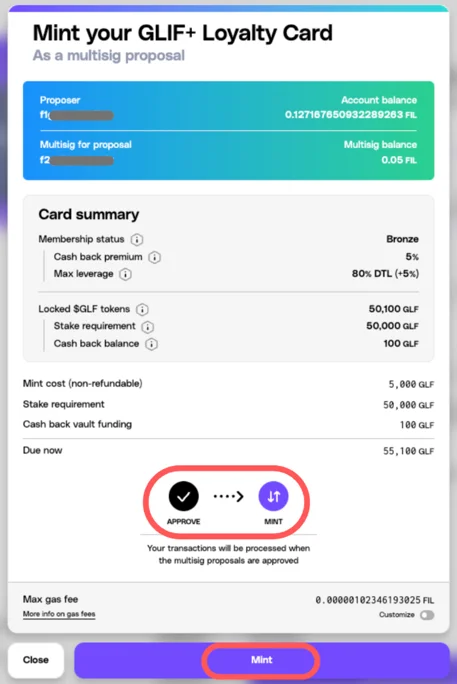
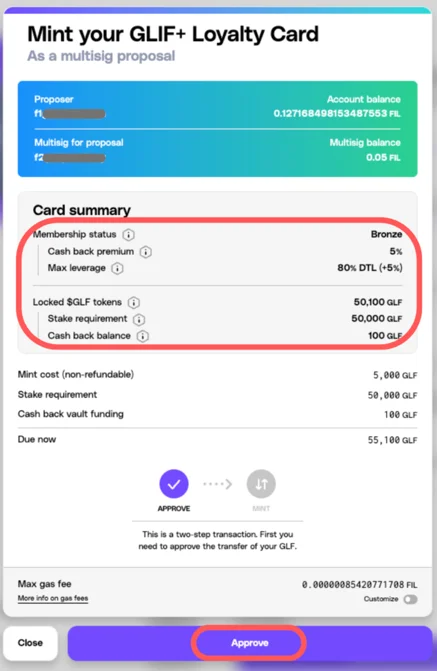
Review the three cost components:
- Mint cost: 5000 $GLF, non-refundable.
- Staking requirement: $GLF required to stake for the selected tier.
- Cash back vault funding: $GLF you choose to deposit for the cash back mechanism.
-
Click 'Mint and activate'.

-
Review the details and click 'Approve'.
-
Confirm the transaction in your wallet. Wait one to two minutes for the transaction to process.
-
After the approval transaction is successfully submitted and confirmed, the active purple icon switches from 'Approve' to 'Mint'. Click 'Mint' to generate another proposal.
Step 5: Approve the first multisig proposal
-
After clicking 'Mint', wait until the transaction is finished.
-
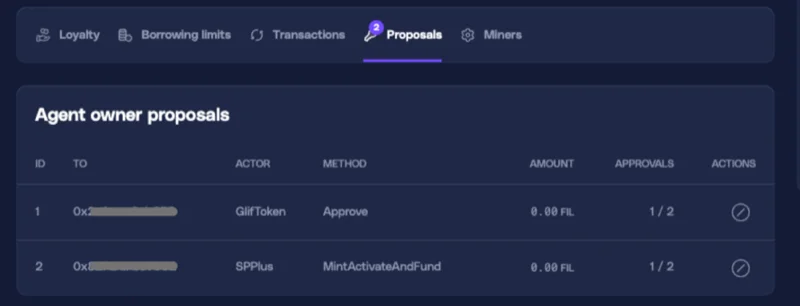
Go to your Agent and open the 'Proposals' tab.
-
The system will generate a multisig 'Approve' proposal and a 'MintActivateAndFund' proposal.
-
Connect the wallet of the next signer. Locate the 'Approve' proposal in the Agent page.
-
Click 'Approve proposal' and confirm in your wallet.
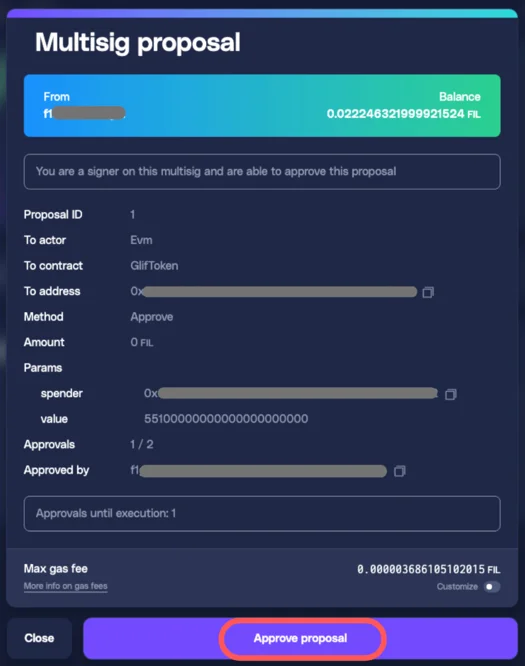
- Connect each signer and approve the proposal. All signers must approve the proposal for it to be executed. Wait one to two minutes for the transaction to process.
WARNING
If you see an error at this stage, it is because the 'MintActivateAndFund' proposal cannot be approved until the 'Approve' proposal is approved by all other signers. Please wait until the 'Approve' proposal is fully approved before proceeding.

Step 6: Approve the second multisig proposal
-
After the first proposal is approved, return to the 'Proposals' tab.
-
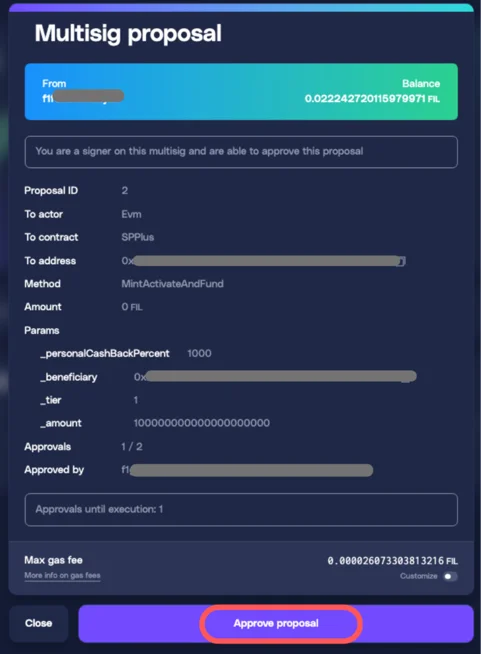
Locate the 'MintActivateAndFund' proposal.
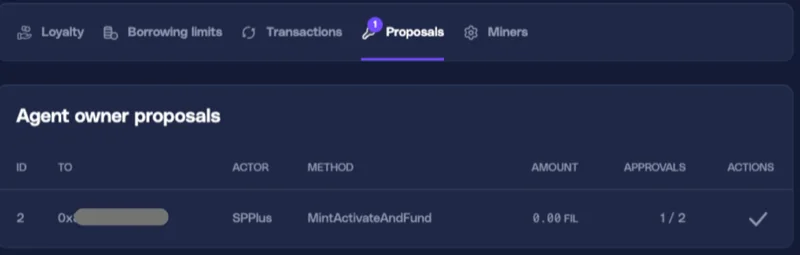
- Click 'Approve proposal' and confirm in your wallet.
-
Repeat this step for all remaining signers.
-
Wait one to two minutes for the transaction to process.
Step 7: View your minted Card
-
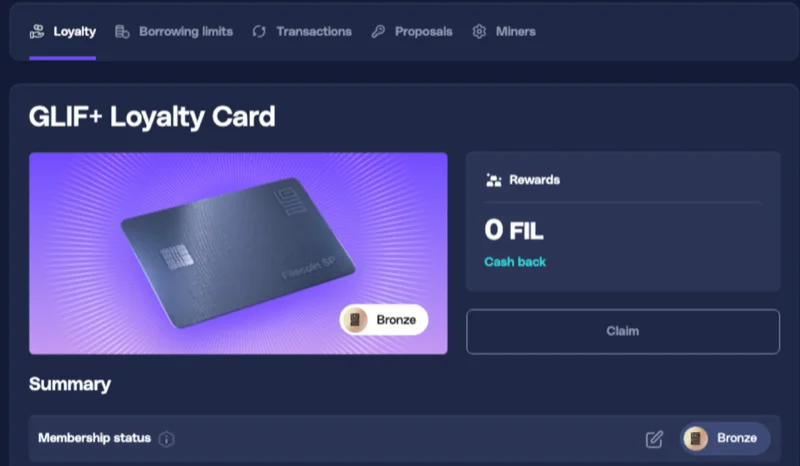
After both proposals are approved, return to the 'Loyalty' tab.
-
You should now see your GLIF+ SP Card minted and showing the tier you selected.
Conclusion
Your GLIF+ SP Card has been successfully minted and activated. You can now use your selected tier to access higher borrowing limits, redeem GLF for FIL at a premium TWAP rate, and manage your GLIF+ benefits through your Agent.
You may want to check out the other tutorials to learn more about managing your GLIF+ SP Card.
Join our community!
- 📢 Stay informed with updates on our blog and X (Twitter)
- 🤝 Connect with us through Discord and Telegram for support and partnerships
- 💬 If you encounter any difficulties, please open a Discord support ticket
- ⚠️ Beware of scammers! GLIF team members have the role “GLIF” or “Moderator”