How to add/withdraw iFIL or GLF in GLIF+
This guide explains how to move GLF or iFIL between your wallet and your GLIF+ Loyalty Card. In your GLIF+ LP Card, managing these balances allows you to control your GLF:iFIL ratio and redeem FIL at a higher premium. For details on premium tiers, see this page. For other tutorials on managing your GLIF+ Card, see this page.
If you are using a multisig wallet, check this tutorial for a step by step guide.
In this tutorial, you will be guided through the following steps:
NOTE
All screenshots and steps in this tutorial are illustrated with iFIL as the example token. The steps for adding or withdrawing $GLF are the same as for iFIL.
Add iFIL/GLF from your wallet to your Card
- Go to the 'Loyalty' tab on the GLIF website, then navigate to the 'Summary' section.
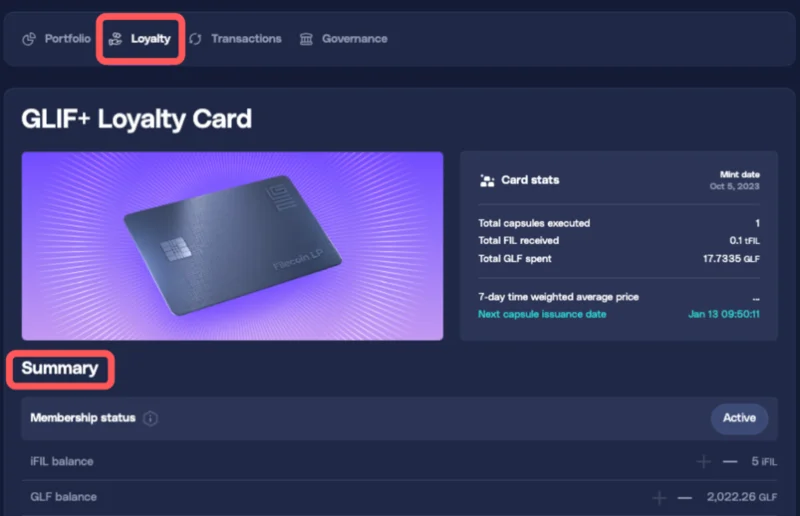
- Find the '+' icon next to your 'iFIL balance' or 'GLF balance', depending on which token you want to move.

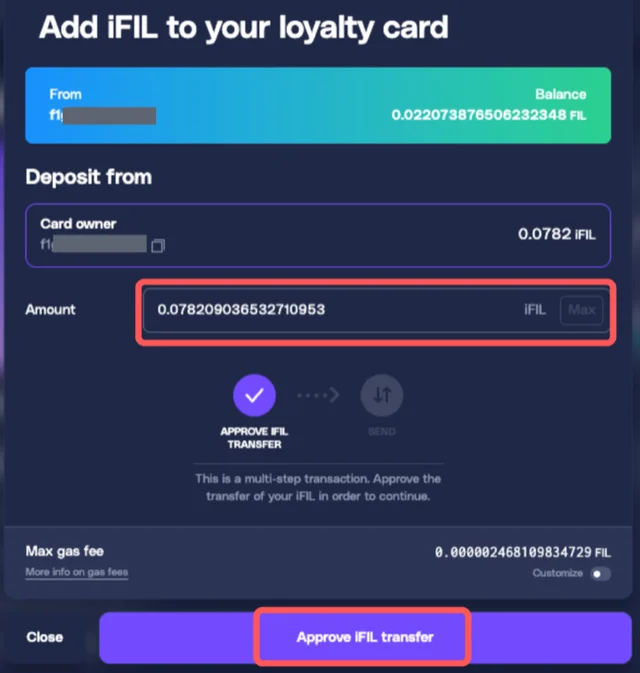
- Enter the amount of the token you want to add. The balance will be moved from the Card Owner wallet address. Click 'Approve iFIL/GLF transfer' to submit the approval.
-
Confirm the transaction in your wallet.
-
Wait for the approval transaction to process. This usually takes 1 to 2 minutes.
-
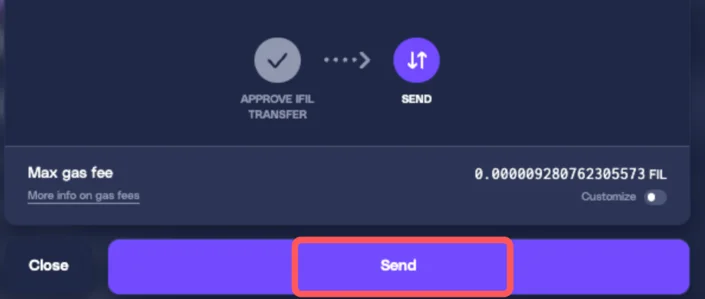
Once the approval is confirmed, click 'Send' to execute the second transaction, which performs the actual token transfer.
-
Confirm the second transaction in your wallet.
-
Wait 1 to 2 minutes for the transfer to finalize.
-
Your iFIL or GLF will be added from your wallet to your Card. The balance inside your Loyalty Card will increase.
Withdraw iFIL/GLF from your Card to your wallet
-
Go to the 'Loyalty' tab on the GLIF website, then open the 'Summary' section.
-
Find the '–' icon next to your 'iFIL balance' or 'GLF balance', depending on which token you want to move.

-
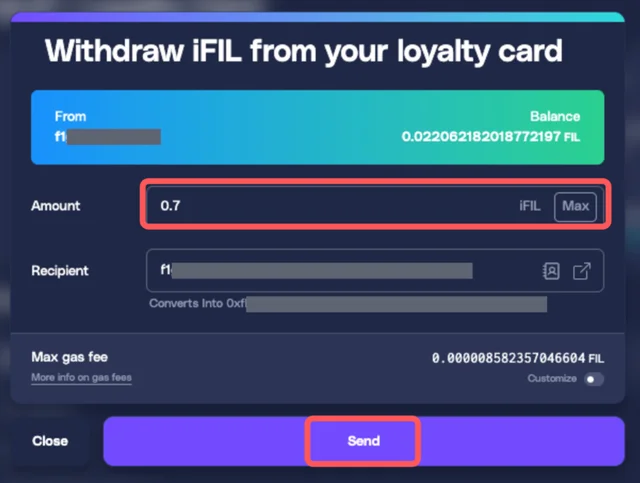
Enter the amount of the token you want to withdraw, and enter the recipient address. By default, the recipient is the Card Owner address.
-
Click 'Send' to initiate the withdrawal.
-
Confirm the transaction in your wallet.
-
Wait 1 to 2 minutes for the transaction to process.
-
Your iFIL or GLF will be sent from your Card to the recipient address you entered.
-
The balance in your Card Summary will decrease accordingly.
Conclusion
Your tokens have been successfully added or withdrawn between your GLIF+ Card and your wallet. You can now use them to activate benefits and manage your GLF:iFIL ratio.
You may want to check out the other tutorials to learn more about managing your GLIF+ LP Card.
Join our community!
- 📢 Stay informed with updates on our blog and X (Twitter)
- 🤝 Connect with us through Discord and Telegram for support and partnerships
- 💬 If you encounter any difficulties, please open a Discord support ticket
- ⚠️ Beware of scammers! GLIF team members have the role “GLIF” or “Moderator”