How to execute your FIL Capsules
This tutorial explains how to redeem a FIL Capsule by using the required amount of GLF and sending the FIL to your chosen recipient. By executing FIL Capsules, the protocol buys $GLF directly from you at a premium to the market price, instead of purchasing from public markets.
For details on how FIL Capsules work, see this page.
For other tutorials on managing your GLIF+ Card, see this page.
If you are using a multisig wallet, check this tutorial for a step by step guide.
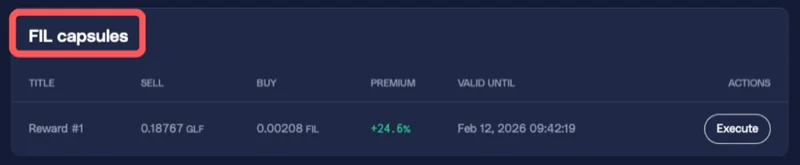
- Go to the 'Loyalty' tab and navigate to the 'FIL Capsules' section.

- Find the Capsule you want to execute. The process is the same for both standard Capsules and Referral Capsules. The amount of GLF you are selling and the amount of FIL you are buying are displayed in the Capsule.
WARNING
Please make sure you have enough GLF in your GLIF+ Card balance and your Card is active to unlock that Capsule.
NOTE
The premium shown here is the difference between the capsule's token price and the current price of GLF:FIL on the DEX. You can check here for a detailed explanation.
-
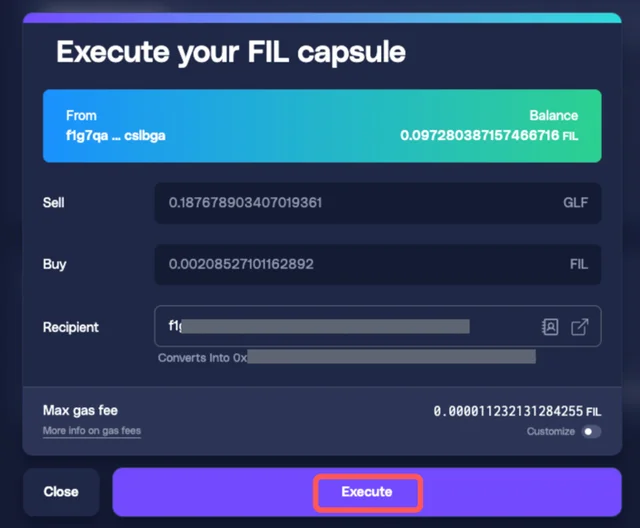
Enter the recipient address for the FIL you are redeeming. You can send it to your own wallet, a multisig wallet, your Agent or any other wallet.
-
Click 'Execute'.
WARNING
It is recommended not to withdraw directly to an exchange, since some exchanges may not support the transaction format and this could result in loss of funds. Because all cash back is sent in a single transaction, a test transfer is not possible. For safety, please withdraw to a wallet you own first, confirm the balance, and then send to an exchange if needed.
-
Wait for the transaction to complete. This usually takes 1 to 2 minutes.
-
After execution, you should see your GLF balance decrease in the Card Summary, and the recipient's FIL balance increase. The details for "Total Capsules Executed," "Total FIL Received," and "Total GLF Spent" will be updated under Card Stats.
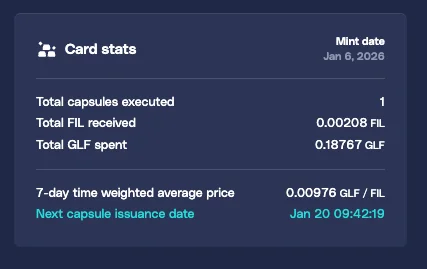
- When you return to the 'FIL Capsules' section, the Capsule should appear as 'Executed'.

Conclusion
Your FIL Capsule has been successfully executed. You can now use the redeemed FIL as needed, while continuing to turn your iFIL positions and $GLF tokens into a stream of FIL redeemable rewards.
You may want to check out the other tutorials to learn more about managing your GLIF+ LP Card.
Join our community!
- 📢 Stay informed with updates on our blog and X (Twitter)
- 🤝 Connect with us through Discord and Telegram for support and partnerships
- 💬 If you encounter any difficulties, please open a Discord support ticket
- ⚠️ Beware of scammers! GLIF team members have the role “GLIF” or “Moderator”