Transfer FIL from MEXC to GLIF
If your FIL tokens are currently on an exchange and you are eager to utilize it to earn rewards, and depositing to GLIF, this guide will simplify the process for you.
This tutorial is specifically for transferring FIL from MEXC. Check this page for tutorials on other exchanges.
TIP
GLIF is compatible with most EVM wallets. This tutorial uses MetaMask wallet as an example; other wallets also work.
You can refer to our FAQ and Wallet tutorials for more information. If you encounter any trouble, please contact GLIF through a Discord support ticket.
Contents
Step 1: Set up an intermediary wallet (optional)
Step 2: Send Filecoin from the exchange to the intermediary wallet
Step 3: Check FIL balance in your intermediary wallet
Step 4: Connect your main wallet to GLIF and Filecoin Mainnet
Step 5: Transfer Filecoin from the intermediary wallet to your main wallet
Step 6: Deposit your Filecoin with GLIF
Step 1: Set up an intermediary wallet (optional)
If the wallet you want to transfer FIL to has an address starting with f1:
If the wallet you want to transfer FIL to has an address starting with f410 or 0x:
- You will need to use an intermediary wallet such as a FilSnap wallet, burner wallet, or Ledger. Check out the step-by-step guide for creating your intermediary wallet by clicking the link.
- This is because some exchanges, including MEXC, do not support transfer to
f410or0xaddresses. Check this page for more details.
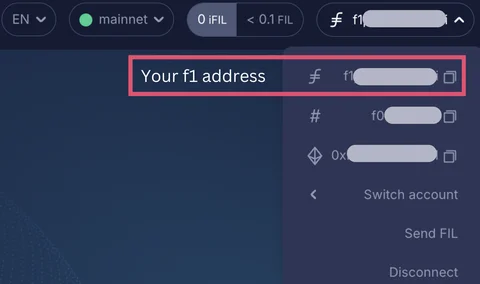
Once done, your intermediary wallet's address, starting with f1, will be visible in the top right dropdown. Copy this address.
Step 2: Send Filecoin from the exchange to the intermediary wallet
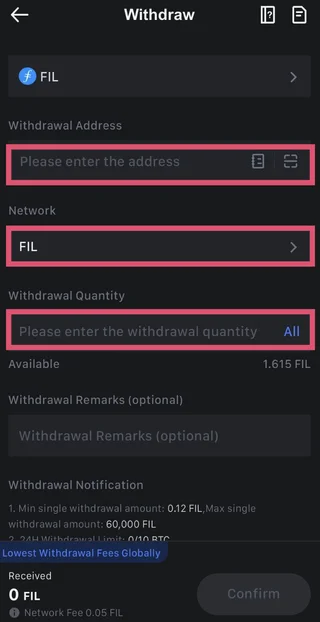
- Go to your centralized exchange, MEXC and locate FIL in your portfolio. Click “Withdraw”.
- Select Network as “FIL”.
- Enter the intermediary wallet address created in step 1. Make sure you have copied the address correctly.
- Enter the amount you want to send.
WARNING
If you are doing this for the first time, it's good practice to send a small amount first in case you make any mistakes.
Once the transaction is complete, your Filecoin balance will appear in the wallet.
Step 3: Check FIL balance in your intermediary wallet
- Once the transaction is completed, you can verify your intermediary wallet balance by clicking the “Wallet” tab on the GLIF website.

- Check your FIL balance in the “Account” tab and view transaction details in the “Transaction” tab.

Step 4: Connect your main wallet to GLIF and Filecoin Mainnet
- Connect to the main wallet you want to transfer FIL to.
- Copy your account address (starting with '0x' or 'f410' address).
For detailed instructions on how to connect your wallet to the Filecoin Mainnet, check out this tutorial.
Step 5: Transfer Filecoin from the intermediary wallet to your main wallet
- Once the Filecoin is in your intermediary wallet, connect to your intermediary wallet.
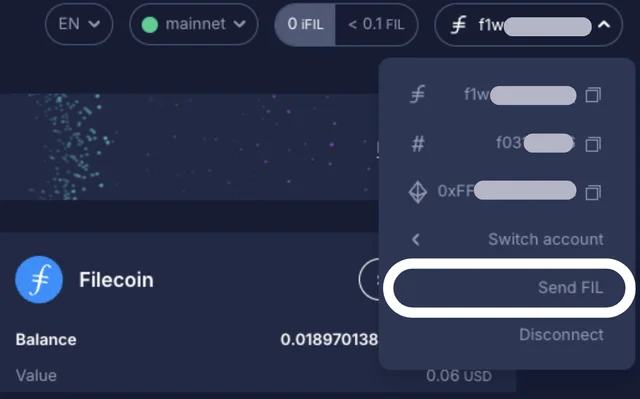
- Click the top-right dropdown in GLIF and choose “Send FIL”.
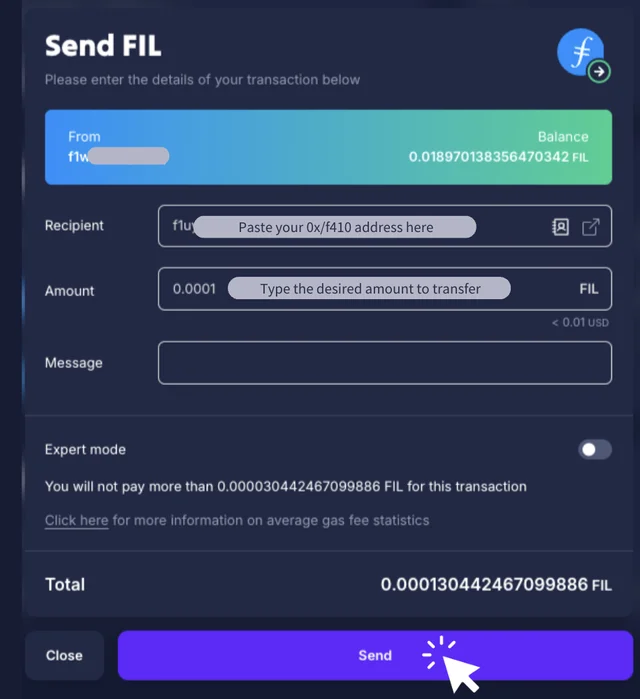
- Paste your main wallet address copied in step 4, into the recipient field in GLIF and specify the amount to send.
NOTE
You need to make sure that you leave enough FIL in the wallet to cover gas fees.
- Then hit “Send”.
After a few moments, your Filecoin balance will appear in your main wallet!
Step 6: Deposit your Filecoin with GLIF
Now, you can deposit your tokens directly from your main wallet to GLIF and start earning rewards! Check the step-by-step guide in this tutorial for detailed deposit instructions.
Conclusion
By following this step-by-step guide, you can successfully transfer FIL from your exchange to GLIF! Remember to always double-check addresses and transaction details to ensure the accuracy and security of your funds.
Join our community!
- 📢 Stay informed with updates on our blog and X (Twitter)
- 🤝 Connect with us through Discord and Telegram for support and partnerships
- 💬 If you encounter any difficulties, please open a Discord support ticket
- ⚠️ Beware of scammers! GLIF team members have the role “GLIF” or “Moderator”